
Deep Dive into BigQuery: How Queries Execute and Why Performance Matters

Modern organizations generate terabytes or even petabytes of data every day. Running analytics on datasets of this scale is no longer just about storing data; it is about executing complex queries efficiently while keeping latency and cost under control.
Traditional data warehouses tightly couple storage and compute resources. As data grows, organizations often have to scale the entire infrastructure, even when only additional compute power is needed. Large joins, aggregations, and uneven data distributions can also create bottlenecks that slow query execution and waste resources.
BigQuery addresses these challenges through a distributed execution engine that separates storage from compute, automatically parallelizes SQL execution, and dynamically allocates resources based on the workload. Understanding how this architecture works is essential for designing efficient data models, writing performant SQL, and troubleshooting slow or expensive queries.
In this article, we will explore how BigQuery executes queries behind the scenes, why issues like data skew impact performance, and the optimization techniques that can significantly improve execution efficiency.
BigQuery’s Distributed Architecture
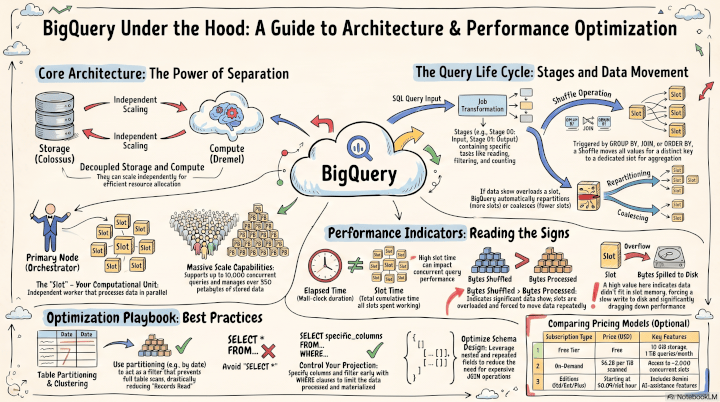
BigQuery’s architecture fundamentally relies on the separation of storage and computing power, allowing both services to scale independently and enabling efficient resource allocation.
This architecture provides several advantages:
- Storage and compute scale independently.
- Multiple users can query the same datasets simultaneously.
- Compute resources are allocated only when needed.
- Workloads remain isolated without requiring infrastructure management.
When you run a query, BigQuery transforms it into a job comprised of execution stages, which in turn contain specific tasks. The computation is distributed across a cluster of computational units called slots. A primary node orchestrates these slots, managing their health and allocating them dynamically to each execution stage.

For example, a standard aggregation query processes through several stages:
Stage 1 (Input & Filtering)
The first stage scans data from distributed storage. During this stage, BigQuery attempts to minimize the amount of data that enters the execution pipeline by:
- applying partition pruning
- using clustering metadata
- pushing filters as close to storage as possible
- reading only the required columns
🌟 Reducing the amount of data scanned at this stage directly lowers both execution time and query cost. Since BigQuery pricing is based primarily on bytes processed for on-demand queries, reducing scanned data also lowers query cost.
Stage 2 (Aggregate / Shuffle)
The shuffle stage is where most expensive analytical operations occur. Whenever a query performs operations such as:
- GROUP BY
- DISTINCT
- Large JOINs
- Window functions
🌟 BigQuery must redistribute data between slots so that rows sharing the same key are processed together. This redistribution is called a shuffle. Although necessary, shuffle is one of the most resource-intensive phases because it requires moving data across Google’s internal network.
Stage 3 (Output)
Once each slot has processed its assigned data, the intermediate results are merged into the final output returned to the user.
🌟 When combining tables, BigQuery intelligently chooses between a BROADCAST join (used for smaller datasets where data is sent to all slots) and a SHUFFLE join (used for large datasets where both tables are shuffled).
The Hidden Performance Bottleneck: Data Skew
One of the biggest silent killers of query performance is data skew, an uneven distribution of data that severely impacts aggregations.
Example:
country

US      350 million rows
UK      20 million rows
Germany 15 million rows
NULL    900 million rows
During the shuffle stage, every row with the same key must be processed by the same slot.
If one key contains hundreds of millions of records while others contain only a few thousand, one slot becomes overloaded while the remaining slots finish quickly and remain idle. Instead of parallel execution, the entire query waits for a single overloaded worker.
How BigQuery Responds
BigQuery continuously monitors workload distribution during execution. If one slot becomes overloaded, the optimizer may automatically introduce a Repartition stage to redistribute work across additional slots. Conversely, when too many slots receive only a small amount of data, BigQuery may introduce a Coalesce stage to merge work and improve efficiency.
Although these adaptive optimizations improve execution, they still introduce additional data movement and increase slot consumption. Preventing skew is almost always more efficient than allowing BigQuery to correct it during execution.
How to spot data skew in the Execution:
- Bytes shuffled exceeds Bytes processed: This indicates slots were overloaded and BigQuery had to move around more data than it read.
- High discrepancy between average and maximum time: A significant difference between the average compute time and the maximum compute time across slots heavily points to a data skew.
- Extremely high Slot time consumed: This indicates slow execution and can negatively affect concurrent queries.
Advanced Optimization Techniques
To avoid Resources Exceeded errors and minimize slot time, consider these technical optimization strategies:
1. Schema and Input Optimization
- Partitioning and Clustering: Always leverage partitioning to limit the amount of data BigQuery has to read. A well-partitioned table acts as an early filter and prevents expensive full table scans.
- Nested and Repeated Fields: Instead of relying on highly granular, non-unique columns that require expensive joins and group-bys, use nested and repeated fields (like arrays and structs). This transforms one-to-many relationships into one-to-one relationships, vastly reducing Bytes shuffled and Slot time consumed.
- Filter Early and Avoid SELECT *: Use
WHEREclauses to limit data ingestion early. Instead of runningSELECT *to explore data, use the native Preview tab.
2. Query Computation and Aggregation
- Aggregate Late and Seldom: Aggregations are computationally expensive because they require shuffling data between slots. Whenever possible, avoid unnecessary intermediate aggregations and aggregate only in the outermost query to reduce slot consumption and execution time.
- Use Approximate Functions: If exact precision is not strictly required, swap standard counting functions for their
APPROX_*equivalents (e.g.,APPROX_COUNT_DISTINCT). These functions typically yield results within 1% of the exact number but drastically reduce bytes shuffled and execution time. - Optimize ORDER BY: Placing an
ORDER BYclause without aLIMITforces a single slot in the Output stage to perform the final sort, creating massive computational overhead. Always pairORDER BYwith aLIMITso individual slots can perform intermediate sorts before passing data to the final stage.
3. SQL Function Efficiency
- Data Types Matter: Filtering on numeric types like
INT64orBOOLis significantly faster than filtering onSTRINGorBYTES. - Standard SQL over Custom UDFs: Prefer Standard SQL functions over JavaScript UDFs. Furthermore, avoid overly complex functions if a simpler one suffices. For example, using
LIKEis computationally cheaper and faster thanREGEXP_CONTAINSif you only need simple wildcard matching. - Filter Ordering: When writing a
WHEREclause, specify the most selective expression first to drop irrelevant rows before evaluating expensive functions.
Beyond Query Execution
BigQuery continues to evolve beyond a traditional analytical database.
Its query optimizer increasingly relies on execution history and table statistics to improve future query plans automatically. At the same time, capabilities such as BigQuery ML, vector search, continuous queries, Apache Iceberg support, and native integration with Gemini Enterprise Agent Platform allow organizations to build machine learning and generative AI workflows directly where their data resides.
Check out our previous blogs on BigQuery 👇
Generative AI and Machine Learning in BigQuery: What is New?
BigQuery Studio: A Unified Platform for Advanced Data Analytics and AI Workflows
Final Thoughts
BigQuery’s distributed architecture enables organizations to analyze massive datasets with remarkable speed, but achieving the best performance requires understanding what happens behind the scenes. From query execution and slot allocation to shuffle operations and data skew, these concepts can help you design more efficient SQL workloads and optimize both performance and cost.
Whether you are modernizing your data platform, optimizing BigQuery performance, or exploring the latest analytics and AI capabilities on Google Cloud, contact us today to learn how BigQuery and Google Cloud can accelerate your data and AI journey.
Author: Umniyah Abbood
Date Published: Jul 28, 2026


